The submission hook has been updated to take into account WordPress 4.3 changes.
Given the amount of requests we have received, here’s a supplementary tutorial on how to set up Gravity Forms Password Recovery pages!
You can find the related tutorials at: 1st, 2nd, 3rd.
This tutorial will most probably be the hardest one, hence it will follow a slightly more detailed explanations on why, how and what.
Prerequisites
First we need to set up two Gravity Forms forms and two form rendering pages. The code attached to these will be presented and explained later.
Recover Password Step 1
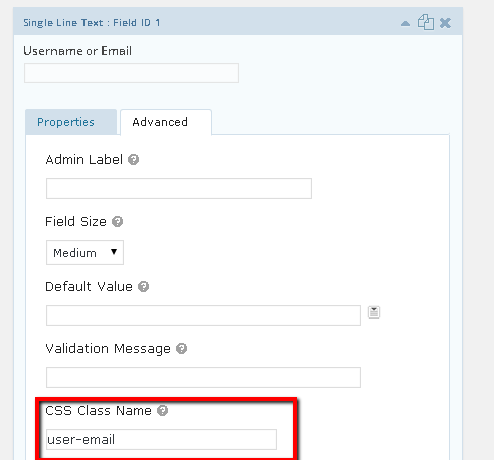
The form should have one field – username or email, with the user-email CSS class assigned to it: You will most probably need to create custom form redirection, which informs the user on successful password recovery request.
Now we need to set up a page, which will render the form. You can use standard Gravity Form shortcode to render that form, nothing else will be needed yet.
Recover Password Step 2
Analogically to the above we need to set up a form and a page.
The form should have two fields assigned: New Password and Repeat Password. The CSS classes assigned to these are respectively new-pass and repeat-pass. Ideally this form should redirect to a separate page on successful submission.
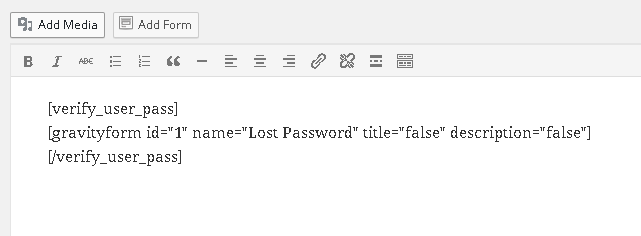
The page used for the form needs to wrap the form shortcode inside the [verify_user_pass] shortcode, which we will code later. Why? We need to make sure that the form will not render in case of direct page visits (which you can block if you want) or insecure / invalid reset tryouts.
Summary
We’re done with the GUI set up here. You should have two forms and two pages created already. The form fields should have specific CSS classes asssigned and the form confirmation / redirect messages should be configured. The pages should have the Gravity Forms embed code placed and the second page should also wrap the code in the aforementioned shortcode.
Into the Code
This part is really hard to understand. I’ll do my best to explain the code and the reasons of such an approach. Feel free to ask for clarification if needed. As always the code is explained inside the .git gist as a PHP comment. Use cases are explained in here.
Hooks assigned to the first form
Similarly to the Gravity Series Login tutorials we will set up two hooks here – one for validation and one for the pre / after form submission hooks.
The validation hook
What are we doing above? Basically we’re checking if the user has provided the email address, which we validate for existence. If the string provided didn’t seem like an email address we check for the particual user, based on his username existence. If both of these checks fail the form will not submit. You may notice that we also check if the reset password is allowed. This functionality can be filtered in WordPress, hence a helper method has been introduced which does the check for us.
The submission hook
The above code is “a bit” more complex than the previous submission hooks. Basically we’re repeating some steps from the validation hooks here, that is we identify if the the user submitted his emailaddress or username. Based on that we generate a random hash, with which we update the user database data. This is followed by several checks (multisite usage / filters applied etc.). Some of the functionality has been introduced by the in-depth-analysis of the wp-login.php file source code.
Basically one needs to make sure that the /recover-password/ prefix matches the second form page created URL. This is the part of the link that users will receive to their email account upon successful form submission. Hence it needs to match the URL address of the second form, where the whole validation will occur.
You may also notice, that aside from the typical, wp-login.php query string parameters there’s also a method key. Basically with the second form hooks we will hook into init action, that will verfiy the key validatiy and redirect the user to the same page with some security cookies set. The reason for the absence of this key in the browser URL bar is due to security risks, one may be imposed to, while applying the password recovery in a public place.
Hooks assigned to the second form
Apart from the Gravity Forms hooks, there are two other functions which are required for the form functionality.
The following piece of code is assigned to init hook, because it’s triggering redirect and it’s also setting up some cookies. These needs to be done before any output / headers were already sent to the browser.
What we’re basically doing here is to check whether or not the proper validation key has been set, whether or not we have been directed here from the previous, custom step. And finally whether or not the associated user data was returned correctly.
You may notice that we’ve set up the global $gf_reset_user; variable. We will use this variable later on in Gravity Forms hooks calls. These are not directly related one to another, hence the global variable trick.
The verifcation shortcode
Well the reason to use that shortcode is to make sure that the form will not be rendered in case of one of the following:
Direct page access (which may be prevented by some extra code, not covered here).
Invalid / used key recovery attempt
In case both of these didn’t occur a user will be allowed to modify his password. To do so we’ll need to introduce two last hooks and assign them to Gravity Forms.
Validation and Submission hooks
The validation hook checks if the two passwords match each other, simple, right?
The pre submission hook makes usage of the global variable introduced before. It validates the user validity, and if provided updates his password. Lastly it removes the verification cookie and logouts the user. Since there’s no redirect applied here, the user will not logout right before page reload. This is to give you freedom and aply redirection manually from the Gravity Forms form editor.
And that’s it. There’s no public preview to the forms.
Last words
Bear in mind that the _1 suffixes and $_POST[‘input_1’] may differ on your part. They are strictly connected to each user site set up and you will certainly need to alter these numbers to match your set up.
We’re looking forward to hearing back from you!
Need Help with Gravity Forms Related Task?
Codeable is the only WordPress freelancer platform. We match customers to the best WordPress experts. We help customers solve any WordPress problem.
By browsing through the site and filling in the Contact Forms you agree to our PRIVACY POLICY. Moreover WP doin website uses COOKIES to improve your experience. We assume you're ok with this, but you can opt-out if you wish. ACCEPTREJECTCookie settings
Privacy & Cookies Policy
Privacy Overview
This website uses cookies to improve your experience while you navigate through the website. Out of these, the cookies that are categorized as necessary are stored on your browser as they are essential for the working of basic functionalities of the website. We also use third-party cookies that help us analyze and understand how you use this website. These cookies will be stored in your browser only with your consent. You also have the option to opt-out of these cookies. But opting out of some of these cookies may affect your browsing experience.
Necessary cookies are absolutely essential for the website to function properly. This category only includes cookies that ensures basic functionalities and security features of the website. These cookies do not store any personal information.
Cookie
Duration
Description
cookielawinfo-checkbox-advertisement
1 year
Set by the GDPR Cookie Consent plugin, this cookie records the user consent for the cookies in the "Advertisement" category.
cookielawinfo-checkbox-analytics
1 year
Set by the GDPR Cookie Consent plugin, this cookie records the user consent for the cookies in the "Analytics" category.
cookielawinfo-checkbox-functional
1 year
The GDPR Cookie Consent plugin sets the cookie to record the user consent for the cookies in the category "Functional".
cookielawinfo-checkbox-necessary
1 year
Set by the GDPR Cookie Consent plugin, this cookie records the user consent for the cookies in the "Necessary" category.
cookielawinfo-checkbox-others
1 year
Set by the GDPR Cookie Consent plugin, this cookie stores user consent for cookies in the category "Others".
cookielawinfo-checkbox-performance
1 year
Set by the GDPR Cookie Consent plugin, this cookie stores the user consent for cookies in the category "Performance".
CookieLawInfoConsent
1 year
CookieYes sets this cookie to record the default button state of the corresponding category and the status of CCPA. It works only in coordination with the primary cookie.
Functional cookies help to perform certain functionalities like sharing the content of the website on social media platforms, collect feedbacks, and other third-party features.
Cookie
Duration
Description
__cf_bm
30 minutes
Cloudflare set the cookie to support Cloudflare Bot Management.
aet-dismiss
never
Disqus sets this cookie for the functionality of the website’s comment system.
badges-message
never
Disqus sets this cookie for the functionality of the website’s comment system.
drafts.queue
never
Disqus sets this cookie for the functionality of the website’s comment system.
submitted_posts_cache
never
Disqus sets this cookie for the functionality of the website’s comment system.
Performance cookies are used to understand and analyze the key performance indexes of the website which helps in delivering a better user experience for the visitors.
Cookie
Duration
Description
__jid
30 minutes
Disqus sets this cookie to remember the user's Disqus login credentials across websites that use Disqus.
Analytical cookies are used to understand how visitors interact with the website. These cookies help provide information on metrics the number of visitors, bounce rate, traffic source, etc.
Cookie
Duration
Description
__gads
1 year 24 days
Google sets this cookie under the DoubleClick domain, tracks the number of times users see an advert, measures the campaign's success, and calculates its revenue. This cookie can only be read from the domain they are currently on and will not track any data while they are browsing other sites.
_ga
1 year 1 month 4 days
Google Analytics sets this cookie to calculate visitor, session and campaign data and track site usage for the site's analytics report. The cookie stores information anonymously and assigns a randomly generated number to recognise unique visitors.
_ga_*
1 year 1 month 4 days
Google Analytics sets this cookie to store and count page views.
_gh_sess
session
GitHub sets this cookie for temporary application and framework state between pages like what step the user is on in a multiple step form.
brwsr
1 year 1 month 4 days
This cookie is set by the provider Impact Radius. This cookie is used for affiliate marketing.
CONSENT
2 years
YouTube sets this cookie via embedded YouTube videos and registers anonymous statistical data.
disqus_unique
1 year
Set to record internal statistics for anonymous visitors.
Advertisement cookies are used to provide visitors with relevant ads and marketing campaigns. These cookies track visitors across websites and collect information to provide customized ads.
Cookie
Duration
Description
__gpi
1 year 24 days
Google Ads Service uses this cookie to collect information about from multiple websites for retargeting ads.
DSID
1 hour
This cookie is set by DoubleClick to note the user's specific user identity. It contains a hashed/encrypted unique ID.
IDE
1 year 24 days
Google DoubleClick IDE cookies store information about how the user uses the website to present them with relevant ads according to the user profile.
test_cookie
15 minutes
doubleclick.net sets this cookie to determine if the user's browser supports cookies.
VISITOR_INFO1_LIVE
5 months 27 days
YouTube sets this cookie to measure bandwidth, determining whether the user gets the new or old player interface.
YSC
session
Youtube sets this cookie to track the views of embedded videos on Youtube pages.
yt-remote-connected-devices
never
YouTube sets this cookie to store the user's video preferences using embedded YouTube videos.
yt-remote-device-id
never
YouTube sets this cookie to store the user's video preferences using embedded YouTube videos.
yt.innertube::nextId
never
YouTube sets this cookie to register a unique ID to store data on what videos from YouTube the user has seen.
yt.innertube::requests
never
YouTube sets this cookie to register a unique ID to store data on what videos from YouTube the user has seen.


 You will most probably need to create custom form redirection, which informs the user on successful password recovery request.